Make a quote from your dashboard or phone
Make an estimate for a client yourself, send it as a link or download the PDF.
Owners and team members can make quotes without opening the public calculator or a website. It works the same on a computer and on the phone app.
Steps
Open Quotes (on a phone, the Quotes tab at the bottom). It opens on New quote. If your company has more than one brand, pick the Brand at the top; we remember the last one you used.
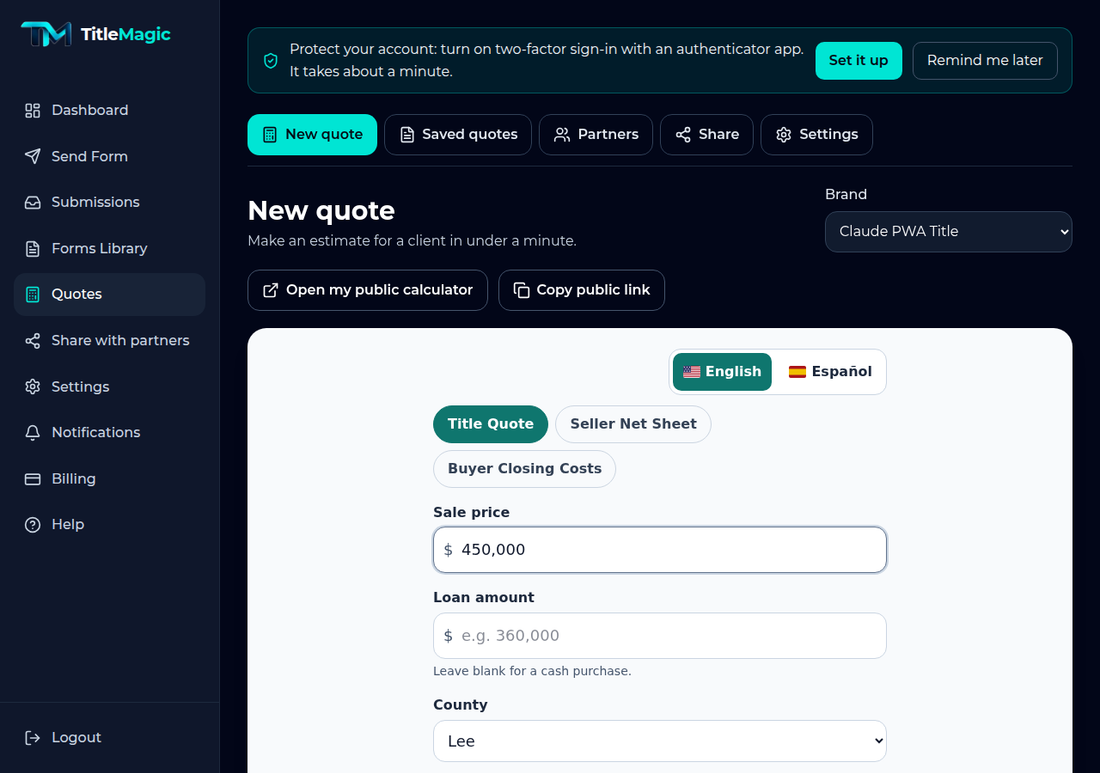
Type the sale price and pick the county. The estimate appears as you type. Tap Add details for commissions, taxes and extra items, and Explain this estimate for a plain-language summary. Use English | Español at the top to switch language.
To give it to a client, tap Send in English or Send in Spanish, then choose text, email or your phone's share sheet. The client gets a link that opens the PDF with your brand's logo and colours. The quote is saved under your name.
Tap Save to keep a quote without sending it, or Share or download PDF to get the PDF file itself.
Find every quote under Saved quotes (the tab at the top of Quotes). Open one to change a number, which saves a new version and keeps the old one, to make the PDF again, or to Stop sharing a link you sent.
Want your name and phone on the PDFs you make? Open Settings, then Your profile, and turn on Show my name and phone on the quote PDFs. It is off until you switch it on.
Good to know: If your brand is not published yet, you can still make quotes for your own team. They carry a DRAFT watermark until you finish **Check your numbers** in Quotes settings, and client links, the public page, the website widget and partner sign-up stay off until you publish.
Related articles
Still need help?
Our team replies by email, usually within one business day.